1. The Core Objective: Where Everything Sits on the Timeline
Most people think a winning ad comes down to a great script. The script matters, but this lesson shows something just as important: where everything sits on the timeline.
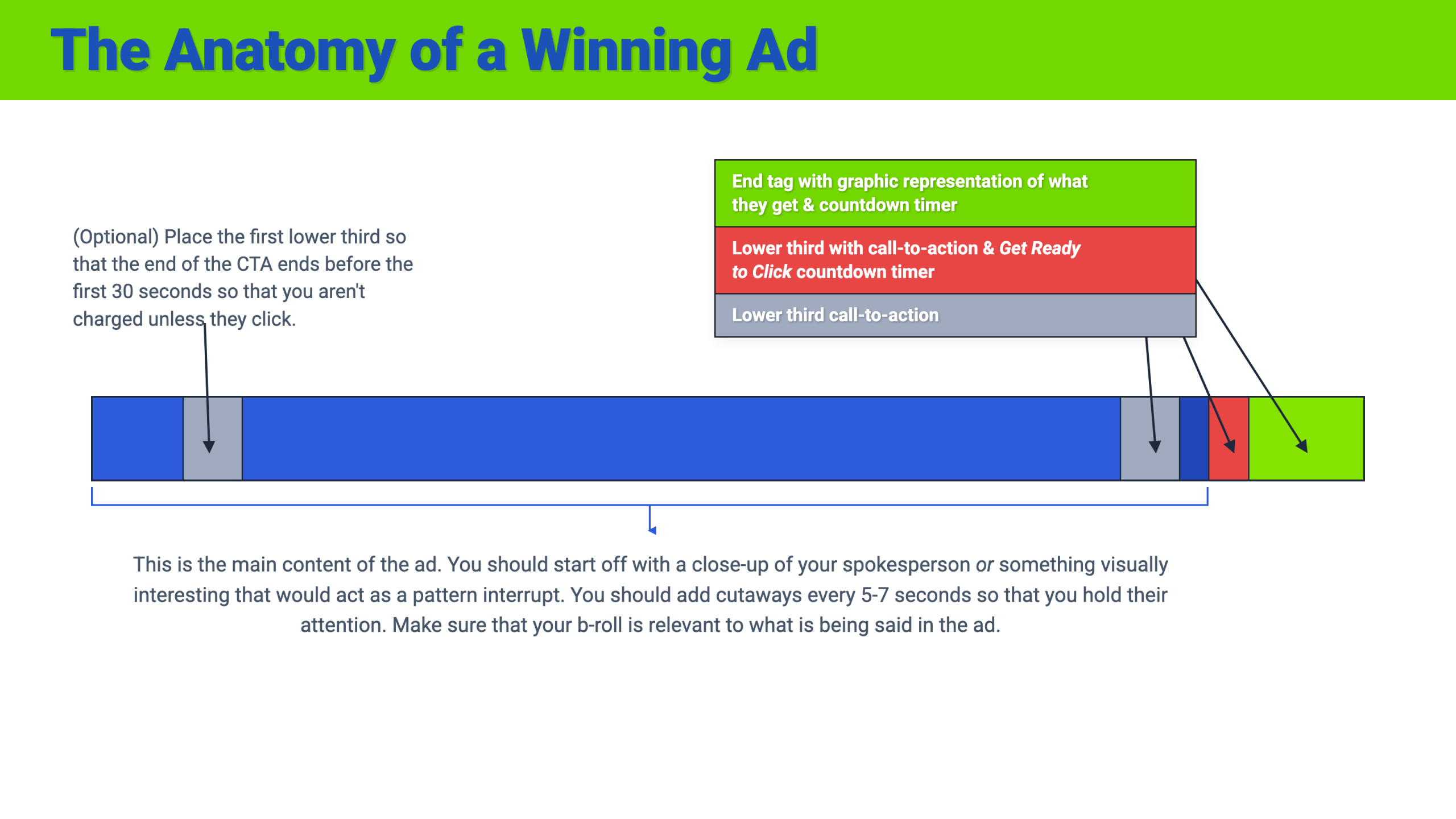
The instructor teaches it from a bird's eye view. Picture your whole video ad as one horizontal bar. The left edge is the first second. The right edge is the last second. Every winning ad he runs follows the same layout on that bar.
"This is the anatomy of an ad, what your ad should look like, from a bird's eye view."
The lesson is built around YouTube ads, and he is clear that some pieces may not carry over to Facebook or Instagram. We call those out below so you know which parts to test where.
2. Step by Step Walkthrough
Step 1: The Main Content (The Blue Section)
Most of the bar is the main content. This is you or your spokesperson delivering the ad: the voice, the narration, the script.
In the lesson, this is the script written with their Perfect ROI Ads Formula, delivered on camera. Everything else on the timeline exists to support this section.
Step 2: Open With a Face or a Pattern Interrupt
The first seconds decide whether anyone watches the rest. The instructor gives you two options.
Option A: A close up of your spokesperson's face.
"People really respond to people's faces."
He points out that we are wired to look for faces everywhere, the same reason people see faces in toast or in the grain of wood. And this is not just a theory for them: "We've split tested this and it does work."
Option B: Something visually interesting, also called a pattern interrupt.
Picture someone scrolling or watching something on YouTube, and suddenly they think: whoa, what's that? That moment of curiosity is the goal.
"Something that's going to spark that curiosity."
Step 3: Change What's on Screen Every 5 to 7 Seconds
Here is the reasoning the instructor shares. He read an article claiming that in the 1970s the average attention span was 27 minutes, and today it is closer to 5 to 7 seconds, because we are constantly scrolling and getting pulled in a thousand directions by notifications.
Whether or not the exact numbers hold up, the operational rule he takes from it is clear:
"Something visually has to be happening every 5 to 7 seconds."
That does not have to mean stock footage every time. You can:
- Cut to B roll (supporting video clips or images)
- Switch camera angles: wide shot to close up, close up to medium, medium to wide
- Animate text onto the screen
The key rule: what you show must match what you are saying. If your script says "finally take that vacation you deserve," show a family that looks like your customer on that vacation. His example: if you are marketing to "Tommy Traffic," who is 34, show a 34-year-old man at an amusement park with his family.
Step 4: The First Call to Action (Lower Third)
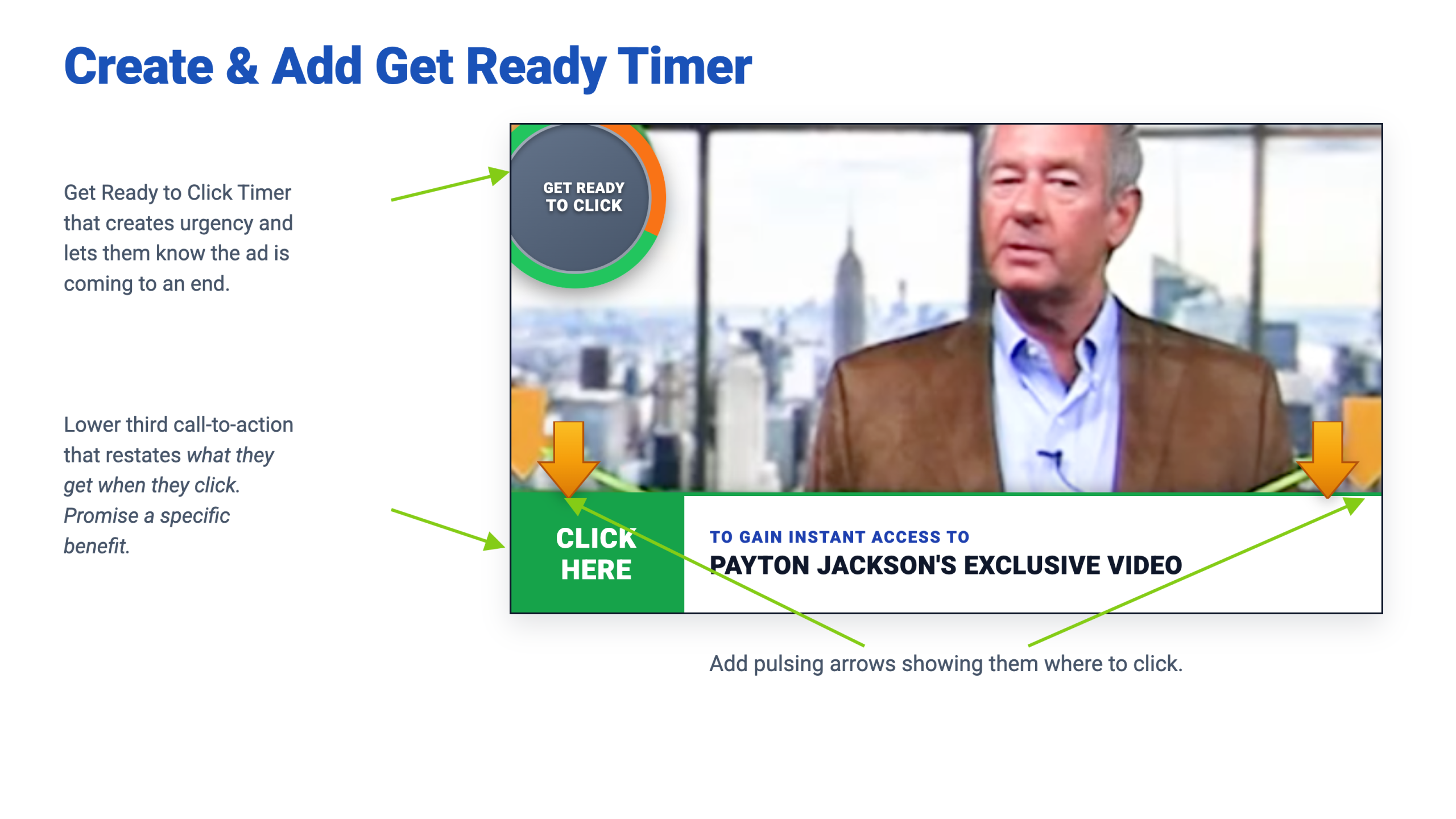
Near the end of the main content comes your first call to action. While you say it out loud, you animate a lower third onto the screen: a text banner across the bottom of the video.
His rules for the lower third:
- Tell them exactly what they get: "Click here to get this." Be specific.
- Promise a specific benefit: Be clear on the immediate payoff.
- Add pulsing arrows showing where to click.
The arrows come from a real lesson with their audience. They work in financial marketing, and many of their buyers are men in their 50s and older who might wonder: click where? The arrows remove the guessing:
"We want them to see exactly where it is they're going to click."
He also gives a warning for YouTube: tone down your claims. Big, exaggerated claims can get an ad shut down, and if it happens too often, your whole ad account.
Step 5: Say Your Call to Action Twice
The instructor usually states his call to action twice, with a short gap between them. For example:
- First call to action: "Click below to get access to my free report. In my free report, I'll show you..."
- Short gap: a little more value and reassurance.
- Final call to action: "If you're ready to finally drop the weight and be the best version of you, click below now to get my free report."
Step 6: Add the "Get Ready to Click" Countdown Timer
On the final call to action, you animate a "Get Ready to Click" countdown timer. It creates urgency and lets people know the ad is about to end:
"Get ready to click, because this ad's almost over. If you want this thing, get ready to click."
Important platform note: This works well on YouTube, but it may not apply to Facebook, Instagram, or other networks, because each platform has strict rules about countdown timers in ad creatives. Test it, and check each network's ad policies first.
Step 7 (Optional): Put a Lower Third Before the 30-Second Mark
This one is specific to YouTube. On most YouTube campaigns, you are not charged unless someone clicks or watches more than 30 seconds.
So the instructor sometimes places an early lower third that finishes animating off the screen before the 30-second mark. People often pick up enough context early to know whether they want the offer, and an early call to action can earn a click and a higher click-through rate.
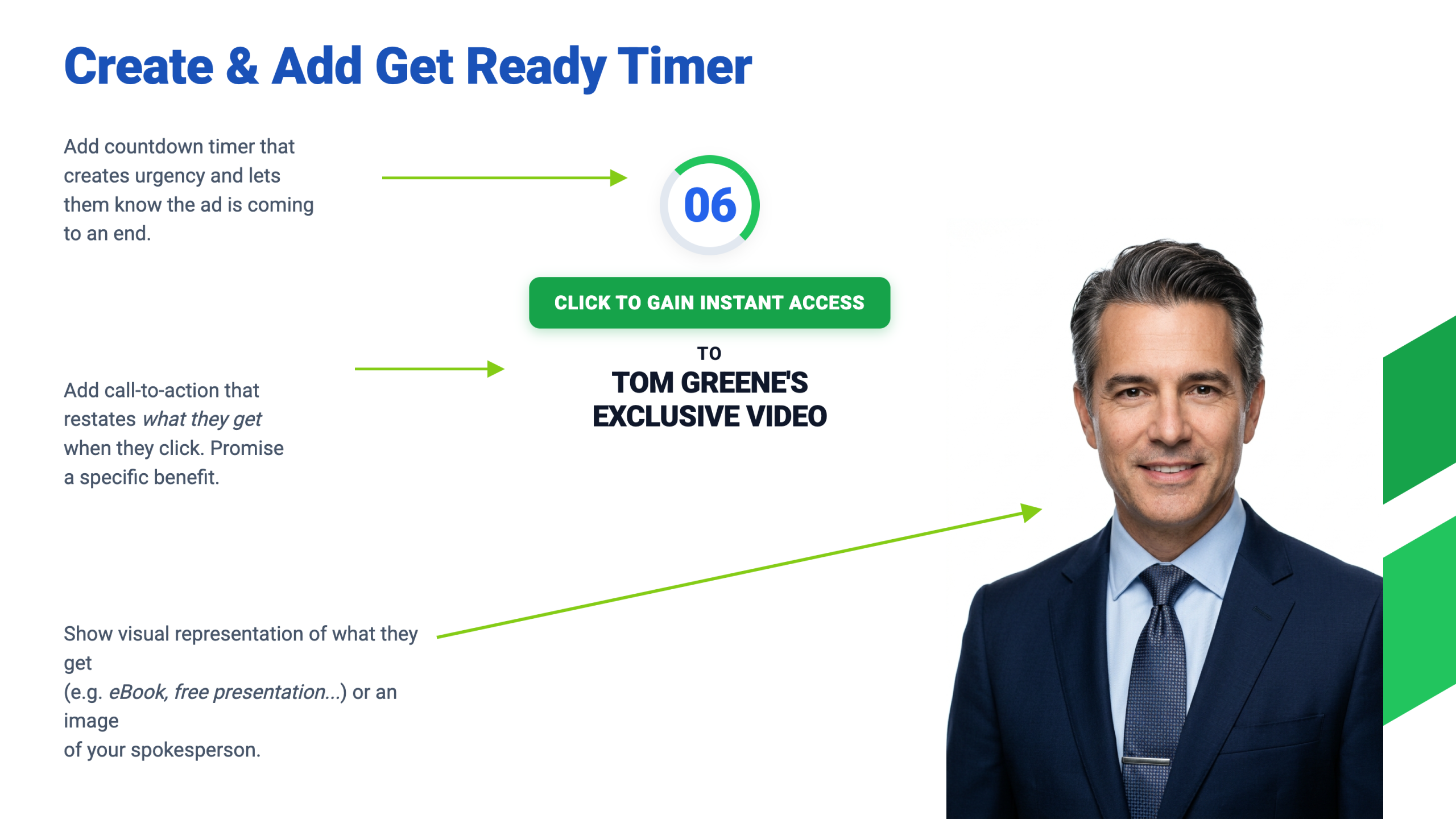
Step 8: The End Tag (The Green Section)
The very end of the ad is the end tag: a final screen with one more call to action, a picture of what they get, and a 10 to 15 second countdown timer.
"We want to tell them what they're going to get and we want to show them what they're going to get. It's all about them, not about you."
- Best: A graphic of what they get: like an ebook cover, a cheat sheet mockup, or a presentation slide. Even though it is a digital download, people want to see something that looks like a real, tangible asset.
- If you have nothing to show: An image of your spokesperson works too.
Step 9: Copy Still Runs the Whole Show
In the middle of the lesson, the instructor stops to make a crucial point about copywriting:
"A lot of people say: I can't sell something at this price. No, you're right. You cannot sell at that price because your copy sucks. Your messaging sucks. All comes down to how good your ad copy is."
3. Who Is on Screen: The Avatar Rules
After the timeline, the instructor shares the rules his team follows for who and what appears in the video. All of them come back to one thing: the customer avatar.
Rule 1: Your Spokesperson Should Look Like Your Avatar
"Men like to buy from men. Women like to buy from women."
Example One: One of their companies builds websites for mental health professionals. Their avatar, "Natasha," is a woman in her 30s opening a private practice. When hiring spokespeople, they specifically hire women in their 30s who look like Natasha. It performs exceptionally well.
Example Two (The Experiment): For their financial avatar, "Bob," a man in his 50s, they ran the exact same script twice: once with the instructor (younger) and once with an actor in his 50s. The younger speaker hit the target CPA, but the spokesperson in his 50s crushed it:
"Why? Because he looked like our avatar."
Rule 2: Show People Like Your Avatar Receiving the Benefits
When your copy describes the dream outcome, your footage should show someone like your customer living that outcome. If marketing to "Bob" who dreams of an Alaskan cruise, show Bob, his wife, and their grandkids on a cruise ship in Alaska. The copy can stay broad, but the footage gets hyper-specific.
Rule 3: Show People Facing the Same Challenges as Your Avatar
Show the pain point too. For a health product, show an overweight man sitting on the basketball bench, sweating and drinking water while his friends play and he makes an excuse about his bad back.
Rule 4: Show People Doing the Hobbies and Interests in Your Avatar
"It's not just for helping you write the copy, but it's also to help the video production people create the ad for you so that it resonates with people."
4. The Trap to Avoid: Aesthetic Footage vs. Avatar Footage
Choosing footage because it looks cinematic instead of because it matches your avatar quietly kills ad performance. Nice stock footage of the wrong people causes subconscious disconnect. Before inserting any B-roll clip, ask: does this look like my customer, their exact pain point, or the life they desire?
5. The Rule of Thumb: Complete Video Ad Sequence
- Open with a close-up face or a pattern interrupt.
- (Optional) Lower third call to action that finishes before 30 seconds.
- Main content with visual changes every 5 to 7 seconds that match the spoken words.
- First call to action with a lower third and pulsing arrows.
- Short gap with additional reassurance.
- Final call to action with a lower third and "Get Ready to Click" timer.
- End tag showing what they get, plus a 10 to 15 second countdown.
6. How We Apply This at Digital Advocators
Our avatar is the boutique agency founder, consultant, and entrepreneur looking to turn attention into high-ticket clients. Following the end tag rule ("show them what they get"), our lead magnets are rendered as tangible, physical blueprints so prospects can immediately see the value before clicking.
